 Meet Tracy the Turtle
Tracy lives in a Python canvas and draws whatever you describe. Students learn programming by moving a turtle, turning, and painting shapes — the same playful start Seymour Papert imagined for Mathland, now ready for the classroom.
Tracy is a Python turtle. You write commands like forward(100) or right(90), press Run, and Tracy draws the result on a canvas. Every program is a picture, and every picture is a chance to reason about angles, distances, patterns, and loops.
That makes Tracy a perfect first step into text-based programming. Beginners see cause and effect immediately: a typo becomes a wobbly line, a loop becomes a spiral, and a function becomes a reusable brushstroke.
Tracy was built around the idea that programming and creative expression belong together. Students write real Python while making flowers, fractals, and animations. The syntax is small, but the canvas is huge.
Inspired by Seymour Papert's Logo turtle and Mathland, Tracy turns the screen into a place to experiment with math: angles become turns, coordinates become positions, and variables become colors and sizes. Students are doing mathematics by making things, not just watching them.
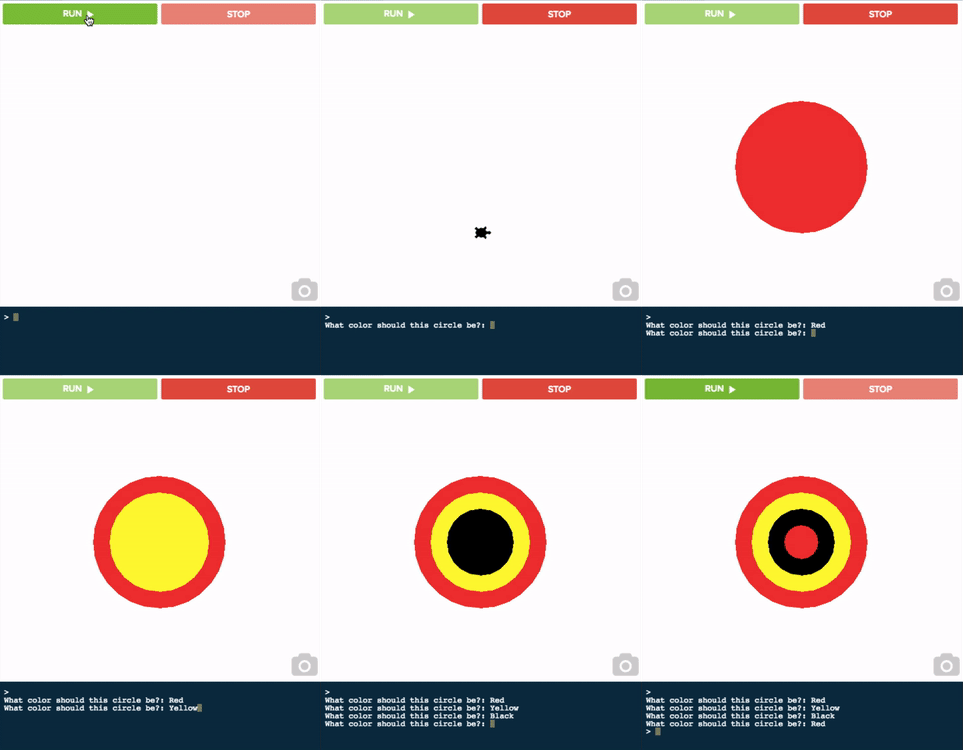
This is the real CodeHS editor. Press Run and watch Tracy draw a flower made of circles. Then change the colors, sizes, or number of petals to make it your own. No account, no install.
color("purple") to your favorite colorcircle(30) after every turnfor loop to draw more petalsbegin_fill() and end_fill() for solid shapesspeed(0) to draw instantlyTracy is friendly. The tools around Tracy are the real thing: the same editor students keep using through AP Computer Science, with the controls a first-time programmer actually needs turned on.
Every revision saves automatically, so students can scrub back through their own history to see how a solution evolved, recover a version that worked, or show their work.
Plain-language error messages, a built-in documentation tab for every command, and moderated AI hints that nudge toward the fix without handing over the answer.
Works in the browser on any device, Chromebooks included, with nothing to install. Tracy lives in the cloud, so a student's canvas is ready wherever they log in.
Tracy starts with simple movement and grows with the student. The same turtle that draws a square can build a Sierpinski triangle or animate a dozen turtles across the screen.
# Low floor: a simple square
for i in range(4):
    forward(100)
    right(90)
Four lines of code, one square.
# High ceiling: a recursive fractal
def draw_triangle(points, color):
    color(color)
    begin_fill()
    up()
    goto(*points[0])
    down()
    goto(*points[1])
    goto(*points[2])
    goto(*points[0])
    end_fill()

def midpoint(p1, p2):
    return ((p1[0]+p2[0])/2,
            (p1[1]+p2[1])/2)

def sierpinski(points, degree):
    colors = ["blue", "red",
              "green", "yellow",
              "white"]
    draw_triangle(points, colors[degree])
    if degree > 0:
        sierpinski([points[0],
                    midpoint(points[0], points[1]),
                    midpoint(points[0], points[2])],
                   degree - 1)
        sierpinski([points[1],
                    midpoint(points[0], points[1]),
                    midpoint(points[1], points[2])],
                   degree - 1)
        sierpinski([points[2],
                    midpoint(points[2], points[1]),
                    midpoint(points[0], points[2])],
                   degree - 1)

points = [[-150,-100], [0,150], [150,-100]]
sierpinski(points, 4)
Recursion turns the same turtle into fractal art.
Ready to keep drawing? CodeHS has a full Intro to Python with Tracy course, open sandbox projects, and a gallery of student demos.
A complete beginner course that teaches Python through drawing, art, and animation.
Jump straight into a new Python Turtle sandbox and start drawing immediately.
Browse community turtle projects, remix them, and share your own creations.
See what students have built, from starbursts and rainbows to castles and games.
Free for students and teachers. Start with the Intro to Python with Tracy course or jump straight into the sandbox and make your first masterpiece.